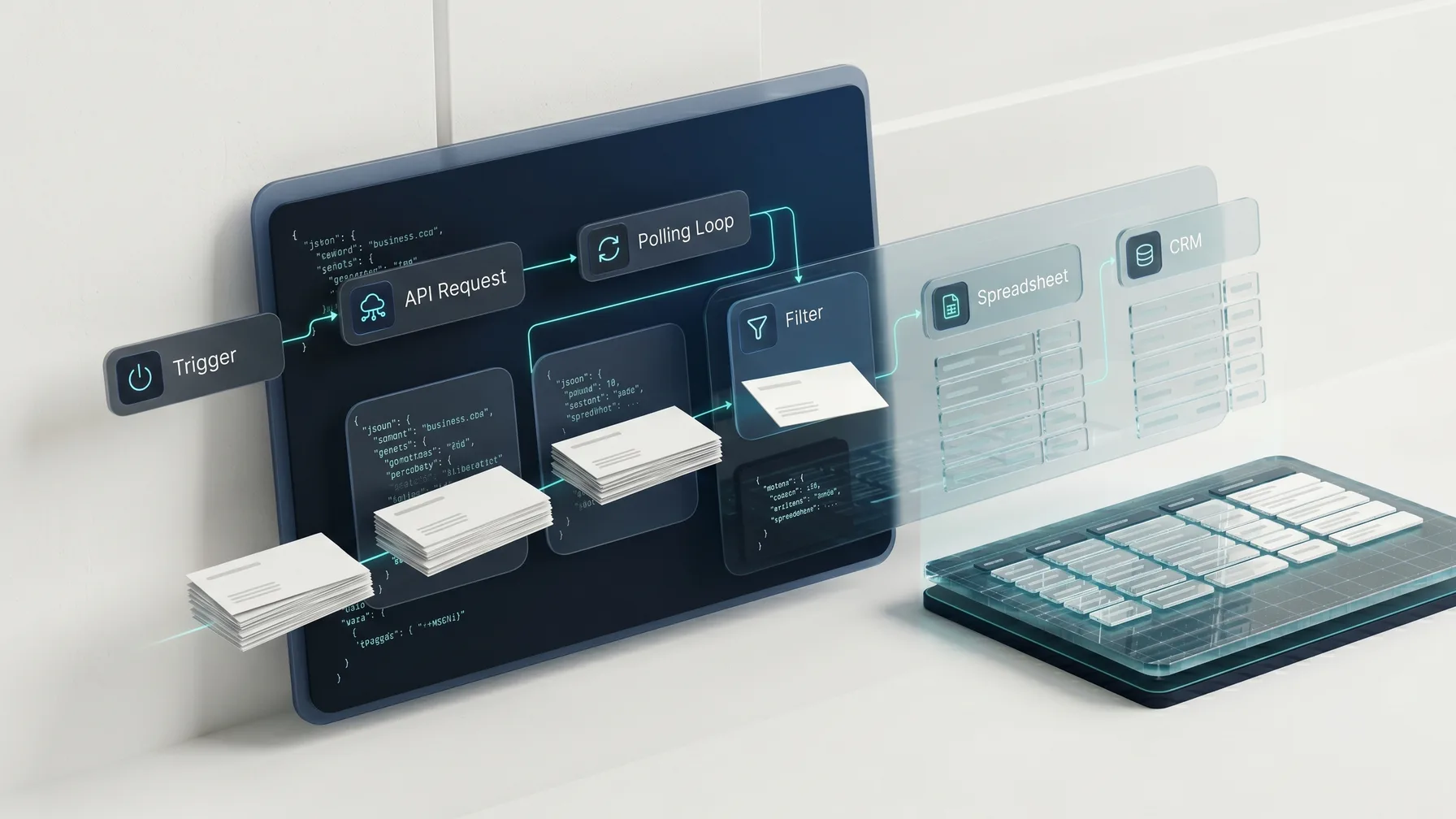
If you are building a Make.com lead generation workflow for local prospecting, the data-acquisition step is where most scenarios get messy. Finding local businesses, their websites, phone numbers, and contact emails usually means maintaining browser scrapers and selectors that break. biz collect gives Make a cleaner path: one HTTP module sends a location and keywords to /v1/search, you get back an async job_id, then a polling loop checks /v1/jobs/:id until the structured JSON is ready. This guide builds a complete Make scenario that finds local businesses, extracts deduped emails from their websites, and writes the results to Google Sheets, a CRM, or any downstream app.
Why Use an API for Lead Generation in Make?
Make (formerly Integromat) is excellent at connecting apps: triggers, HTTP calls, routers, iterators, aggregators, data stores, and scheduled scenarios. But local lead generation has a data-acquisition step that becomes fragile if you try to automate it with browser scraping inside Make.
A typical "Make Google Maps scraper" setup starts with a headless browser service, a search URL, selectors for listing cards, and separate logic for visiting each website to find emails. That can work for a demo, but it creates ongoing maintenance. Page layouts change, sessions fail, selectors break, and website email extraction becomes a second scraper to babysit. If you are weighing that against a data API, the Google Places API vs scrapers vs business data APIs trade-off lays out the differences.
biz collect is designed for the opposite shape. It is an LLM-native business contacts API built for agents, workflow tools, scripts, and CRM enrichment. You call /api/v1/search with parameters such as location, keywords, radius_km, and scrape_emails. The API returns a queued job. You poll /api/v1/jobs/:id until it completes, then use the returned JSON records in the rest of your scenario.
That lets your Make scenario focus on routing:
- Run searches on a schedule or from a webhook.
- Request structured local business data from biz collect.
- Wait and poll until the async job completes.
- Split returned businesses into individual bundles.
- Filter, dedupe, or score records.
- Send qualified leads to Google Sheets, HubSpot, Pipedrive, Airtable, Notion, or another app.
For API details, start with the API docs, integration examples at integrations, and plan limits on pricing. If you want to see the async search-and-poll model before you build, the how biz collect works page walks through the same lifecycle this scenario automates. Make's own documentation is useful for the standard modules used here, especially the HTTP module, the Sleep tool, the Iterator, and the Google Sheets module.
What This Scenario Builds
The scenario in this tutorial automates local leads from search request to destination output. It uses standard Make modules, with biz collect handling the business search and Make handling orchestration.
The final scenario looks like this:
- A trigger starts the scenario manually, on a schedule, or from a webhook.
- An HTTP module sends a
POSTrequest to biz collect/api/v1/search. - The response returns a
job_idand job status. - A Sleep module pauses briefly before polling.
- A second HTTP module calls
/api/v1/jobs/:id. - A router or repeater checks whether the job status is
completed. - If not completed, the scenario waits and polls again, with a retry limit.
- Once completed, an Iterator turns the returned businesses into individual bundles.
- Destination modules send leads to Google Sheets, a CRM, or another app.
- Error routes handle failed jobs, timeouts, and empty result sets.
You can adapt the same pattern for one-off prospecting, recurring market scans, agency lead lists, CRM enrichment, or AI-agent workflows that need verified local business contact data.
Prerequisites
Before building the scenario, you need:
- A Make account, on any plan that allows HTTP modules.
- A biz collect API key.
- A destination for the leads, such as Google Sheets, HubSpot, or Pipedrive.
- A clear search definition: location, business category keywords, radius, and whether to extract emails from websites.
biz collect is free to start with 200 signup credits and no credit card. That is enough to build, test, and run small prospecting jobs before committing the scenario to a production schedule. Check pricing for current plan limits.
Data Flow and API Shape
biz collect uses an async job flow because local business search and website email extraction can take longer than a normal synchronous HTTP request. Make handles this well because scenarios can sleep, branch, and repeat.
The basic request is a POST to:
https://bizcollect.dev/api/v1/search
The body includes the local search inputs:
{
  "location": "Manchester, UK",
  "keywords": ["letting agent", "estate agent"],
  "radius_km": 12,
  "scrape_emails": true
}
The response contains a job identifier. The scenario only needs the job_id and status:
{
  "job_id": "job_123456",
  "status": "queued",
  "poll_url": "/api/v1/jobs/job_123456"
}
Then Make polls:
GET https://bizcollect.dev/api/v1/jobs/job_123456
When completed, the result contains structured business records:
{
  "job_id": "job_123456",
  "status": "completed",
  "businesses": [
    {
      "name": "Example Lettings",
      "address": "12 High St, Manchester M1 1AA",
      "phone": "+44 161 555 0101",
      "website": "https://examplelettings.co.uk",
      "emails": ["hello@examplelettings.co.uk", "info@examplelettings.co.uk"]
    }
  ]
}
The contract is stable: start a search, receive a job_id, poll the job endpoint, then process structured JSON. For the authoritative schema, use the OpenAPI reference in the biz collect docs.
Step 1: Create the Trigger
Start with the trigger that matches your use case:
- Run once for testing and one-off searches.
- Schedule for recurring prospecting, such as every Monday morning.
- Custom webhook when another system or agent should start a search dynamically.
For a first version, run the scenario manually and hard-code a location and keywords in the first HTTP module. Once it is stable, replace fixed values with data from a schedule, a Google Sheet of territories, or a webhook payload.
If you want the scenario to accept dynamic searches, add a Custom webhook trigger and send a body like:
{
  "location": "Zurich, Switzerland",
  "keywords": ["law firm", "tax advisor"],
  "radius_km": 10,
  "scrape_emails": true
}
Then the biz collect request can map the incoming webhook fields. Keep the first scenario simple, confirm the response shape, then parameterize.
Step 2: Add the HTTP Module for /api/v1/search
Add an HTTP module set to Make a request after the trigger. Name it Start biz collect Search.
Configure it:
- URL:
https://bizcollect.dev/api/v1/search - Method:
POST - Headers: an authorization header and a content-type header
- Body type: Raw, content type JSON
- Parse response: Yes, so Make exposes the JSON fields
Use these headers:
Authorization: Bearer YOUR_BIZCOLLECT_API_KEY
Content-Type: application/json
For a fixed test search, use this JSON body:
{
  "location": "Miami, FL",
  "keywords": ["med spa", "aesthetic clinic"],
  "radius_km": 20,
  "scrape_emails": true
}
For a webhook version, map the request fields instead of hard-coding them, for example {{1.location}} and {{1.keywords}}, where 1 is the webhook module. If your trigger passes keywords as a comma-separated string, split it into an array first with a split() function or a dedicated module, because the API expects clear keyword input and an array is easiest to control.
After this module runs, you have a bundle with job_id, status, and possibly poll_url. If the request fails, check the API key, the body, and current limits in pricing.
Step 3: Wait Before the First Poll
Add a Sleep module after the search request. Name it Wait Before Polling.
Set a short delay, such as 10 to 20 seconds. Email extraction requires the API to visit business websites, parse pages, and dedupe candidate addresses, so polling immediately after the search request usually adds noise without improving the outcome.
A practical starting point is 15 seconds. The Make Sleep module is capped at 300 seconds per call, which is plenty for a single pause; the polling loop in the next steps is what gives you longer total wait time. For broad searches, lean toward the higher end; for small enrichment jobs, lower it.
Step 4: Poll /api/v1/jobs/:id
Add another HTTP module named Poll biz collect Job.
Configure it:
- URL:
https://bizcollect.dev/api/v1/jobs/{{job_id}}, mapping thejob_idfrom the search response - Method:
GET - Headers: the same authorization header
- Parse response: Yes
Header:
Authorization: Bearer YOUR_BIZCOLLECT_API_KEY
The polling response includes the current job status. Branch on that status rather than assuming the first poll is complete. Typical statuses to handle:
queuedorrunning: wait and poll again.completed: processbusinesses.failed: stop and alert someone or log the failure.
Use the actual status fields from the API docs as your source of truth.
Step 5: Build the Polling Loop
Make does not have a single "loop until condition" module, so you build the loop from standard parts. The most maintainable pattern uses a repeater with a bounded number of iterations and a router that breaks out when the job is done.
The structure is:
- A Repeater set to a maximum number of attempts, for example 20.
- Inside each iteration: a Sleep module, then the
Poll biz collect JobHTTP module. - A Router after the poll with two routes.
- Route A, a filter where
statusequalscompleted, continues to processing and uses a "Stop" or a flag so later iterations short-circuit. - Route B, a filter where
statusequalsfailed, routes to an error handler.
A simple way to avoid wasted iterations is to store the result in a data store or scenario variable on completion and add a filter at the top of the repeater that skips work once the flag is set. With a 15-second Sleep and 20 attempts, the loop waits roughly five minutes before giving up, which suits most email-extraction jobs. Tune both numbers to your search size:
- Fast prospecting tests: 10 attempts at 10 seconds.
- Email extraction jobs: 20 attempts at 15 seconds.
- Large recurring searches: 30 attempts at 20 seconds.
The right value is operational, not theoretical. Give normal jobs time to finish while still surfacing unexpected delays.
Step 6: Split Businesses With an Iterator
Once status is completed, the response contains an array of businesses. Most destination modules work one bundle at a time, so add an Iterator named Split Businesses and point it at the businesses array from the poll response.
After the Iterator, each business is its own bundle with fields like name, address, phone, website, and emails. To get a single primary email and a clean count, add a Set Variable module or use inline functions:
primary_email = {{ first(business.emails) }}
all_emails    = {{ join(business.emails; ", ") }}
email_count   = {{ length(business.emails) }}
If the scenario is specifically for outbound email, add a filter after the Iterator where primary_email is not empty. That keeps the CRM or spreadsheet focused on leads you can act on. If your team also calls prospects, keep records that have a phone number even when no email is found, since email coverage is always partial.
Step 7: Send Leads to Google Sheets
Google Sheets is the easiest first destination because the output is immediately visible. Add a Google Sheets "Add a row" module after the Iterator.
Recommended columns:
Search Job IDBusiness NameAddressPhoneWebsitePrimary EmailAll EmailsEmail CountCreated At
Map the values:
Search Job ID  -> {{ job_id }}
Business Name  -> {{ business.name }}
Address        -> {{ business.address }}
Phone          -> {{ business.phone }}
Website        -> {{ business.website }}
Primary Email  -> {{ primary_email }}
All Emails     -> {{ all_emails }}
Email Count    -> {{ email_count }}
Created At     -> {{ now }}
For a lightweight dedupe strategy, use the website domain or primary email as the unique key. Since the "Add a row" module only appends, add a "Search rows" check before writing, or use a data store keyed on the domain, if strict uniqueness matters.
Step 8: Send Qualified Leads to a CRM
For a CRM such as HubSpot or Pipedrive, the common flow is:
- Search for an existing company by domain or website.
- If no match exists, create the company.
- If
primary_emailexists, search for an existing contact by email. - If no contact exists, create the contact.
- Associate the contact with the company if your CRM requires it.
Keep the first version conservative. Do not create duplicate contacts just because a business has several emails. Start with primary_email, then optionally store the full deduped list in a custom property or note.
A useful company mapping:
name    -> {{ business.name }}
domain  -> {{ replace(replace(business.website; "https://"; ""); "www."; "") }}
phone   -> {{ business.phone }}
website -> {{ business.website }}
If your CRM has strict data rules, add validation before the create modules:
- Only create contacts when
primary_emailis not empty. - Only create companies when
websiteorphoneis present. - Add a source field such as
biz collect Make scenario. - Add the search location and keyword set as campaign context.
That makes it easy to report on which local searches produced useful leads.
Step 9: Add Error and Notification Routes
A lead generation scenario usually runs on a schedule, which means silent failures create stale pipelines. Make handles errors with error handlers attached to modules and with dedicated routes for known failure states.
Add handling for these cases:
- Unauthorized request: API key missing or invalid. Stop and notify the scenario owner.
- Bad request: missing
location, emptykeywords, or invalidradius_km. Write the failed input to an error sheet. - Rate or plan limit: pause the scenario and send an alert with a link to pricing.
- Job failed: notify via Slack or email and include the
job_id. - Job timeout: include the attempt count and last known status.
- No businesses returned: write a successful but empty result with the search parameters.
For a compact run summary, aggregate the businesses before the Iterator and post a single message:
biz collect job {{ job_id }} completed.
Businesses found: {{ length(businesses) }}
With email: {{ length(filter(businesses; length(item.emails) > 0)) }}
This gives you enough visibility to monitor recurring scenarios without opening Make for every run.
Recommended Scenario Layout
Here is the complete module sequence for a practical version:
Trigger (Run once / Schedule / Webhook)
  -> HTTP: Start biz collect Search
  -> Repeater (max 20)
       -> Sleep (15s)
       -> HTTP: Poll biz collect Job
       -> Router
            completed -> Iterator: Split Businesses
                           -> Filter: primary_email is not empty
                           -> Google Sheets / CRM
            failed    -> Notify error
  -> (timeout fallthrough) -> Notify timeout
This pattern avoids custom infrastructure while handling the realities of async APIs: work can be queued, jobs can run for a while, and failed or long-running jobs need an operator-friendly path. If you are weighing Make against other tools, the n8n lead generation workflow shows the same create-wait-poll loop as visual nodes, and the guide to the best local business lead generation tools in 2026 places an automation-plus-API workflow among scrapers, no-code tools, and CRMs.
Start Building
The simplest useful Make.com lead generation scenario is only a few modules: trigger, HTTP request, sleep, poll, router, iterator, and output. The value comes from using an API that returns structured business data and verified website emails instead of asking Make to maintain a scraper.
biz collect is built for this exact pattern: one POST to start a local search, async polling for completion, stable JSON fields, OpenAPI 3.1 docs, and deduped contact emails extracted from business websites. It fits Make, n8n, Zapier, scripts, LLM tools, and CRM enrichment without headless browser maintenance.
You can start free with 200 signup credits and no credit card. Open the API docs, review the integrations, check pricing, and build your first automated local leads scenario in Make today.
Frequently asked questions
- How do I build a lead generation workflow in Make.com?
- Chain five stages: a trigger, an HTTP module that POSTs a city and keywords to /v1/search, a repeater plus Sleep that polls /v1/jobs/:id until complete, an Iterator to split the businesses, and a Google Sheets or CRM module to write the leads. No scraping module is required.
- Which Make modules do I need?
- Two HTTP modules (search and poll), a Sleep module, a Repeater and Router for the polling loop, an Iterator to split businesses, and a destination module such as Google Sheets, HubSpot, or Pipedrive. Optional Set Variable modules clean up the email fields.
- How do I poll an async job in Make?
- Make has no built-in loop-until module, so build it from a Repeater with a bounded iteration count, a Sleep, and the poll HTTP module, then use a Router with filters on status equals completed or failed to break out. A 15-second sleep with 20 attempts waits about five minutes.
- Can I get verified emails from the Make scenario?
- biz collect enriches each business from its own website, so records can include email, website, phone, and address. Filter for records that contain an email to keep only leads you can act on, and keep phone-only records when a call is the better channel.
- Does this work with Zapier or n8n too?
- Yes. The API uses standard HTTP requests, so the same search-poll-iterate-write pattern works in Zapier and n8n as well as Make. Only the polling mechanics differ between tools.
- Is there a free tier to test the Make scenario?
- Yes. You get 200 signup credits plus 20 login credits each day with no credit card, which is enough to wire up and validate the full scenario before scheduling it.