An AI lead generation agent is most useful when it does more than write clever search queries. A practical agent needs a reliable way to find businesses, collect structured contact data, validate the result, avoid duplicate work, and hand clean records to a CRM, spreadsheet, or outreach workflow. Claude, ChatGPT, and Codex can all help orchestrate that process through tool use, but the quality of the workflow depends heavily on the lead data API behind the tool. biz collect is built for exactly that layer: one async API call can search by location, keywords, and radius, then return structured businesses with addresses, phone numbers, websites, and deduped contact emails extracted from business websites.
What an AI Lead Generation Agent Should Actually Do
The phrase "AI lead generation agent" can mean many things. In a production workflow, it should not mean a model guessing companies from memory or scraping search results through brittle browser automation. It should mean an agent that can turn a sales intent into repeatable data operations.
For example, a user might ask:
Find independent accounting firms within 20 km of Austin, collect public website emails where available, and add qualified results to my CRM.
The agent should break that request into a structured task. It needs to decide the target location, keywords, search radius, whether emails are required, how many result batches to run, how to wait for asynchronous jobs, which fields must be validated, and where the final records should go.
That is a tool orchestration problem. The model provides planning, routing, validation, and natural-language interaction. The lead data API provides deterministic execution and stable records. When those responsibilities are separated cleanly, the agent becomes easier to test, cheaper to maintain, and safer to operate.
biz collect fits this pattern because it is an LLM-native business data API. Instead of asking an agent to drive a browser, inspect page layouts, maintain CSS selectors, or parse inconsistent HTML from search pages, you expose a compact API tool. The agent sends a POST request with location, keywords, radius_km, and scrape_emails, receives a job_id, and polls until the structured JSON result is ready. If you are still choosing the data source behind that tool, the Google Places API vs scrapers vs business data APIs comparison covers why the official API and raw scrapers fall short for agent workflows.
That structure is what makes Claude lead generation, a ChatGPT lead generation agent, or a Codex sales prospecting agent viable beyond a demo.
Why Agents Need a Lead Data Tool
LLMs are good at interpreting intent, decomposing work, calling tools, and explaining results. They are not a database of current local businesses, and they should not be treated as one. If your agent asks the model to invent prospects, you get plausible text rather than operational data.
A lead generation agent needs a source of truth for business discovery and contact enrichment. The tool should return fields that a downstream system can trust:
- Business name
- Address and location data
- Phone number
- Website
- Contact emails found on the business website
- Stable identifiers or deduplication-friendly fields
- Job status for asynchronous workflows
The most common failure mode in AI sales prospecting is mixing model creativity with data collection. The model may be useful for classifying whether a business matches a persona, summarizing a website, or drafting outreach after a human-approved record exists. But the collection step should be handled by an API with explicit parameters and predictable output.
biz collect gives the agent that API boundary. You can review the OpenAPI 3.1 documentation at /docs, connect the endpoint to your tool framework, and let the model call it with structured arguments. Because the response fields are stable, you can build repeatable validation, CRM mapping, and spreadsheet output without reverse-engineering page structure.
The Core Architecture
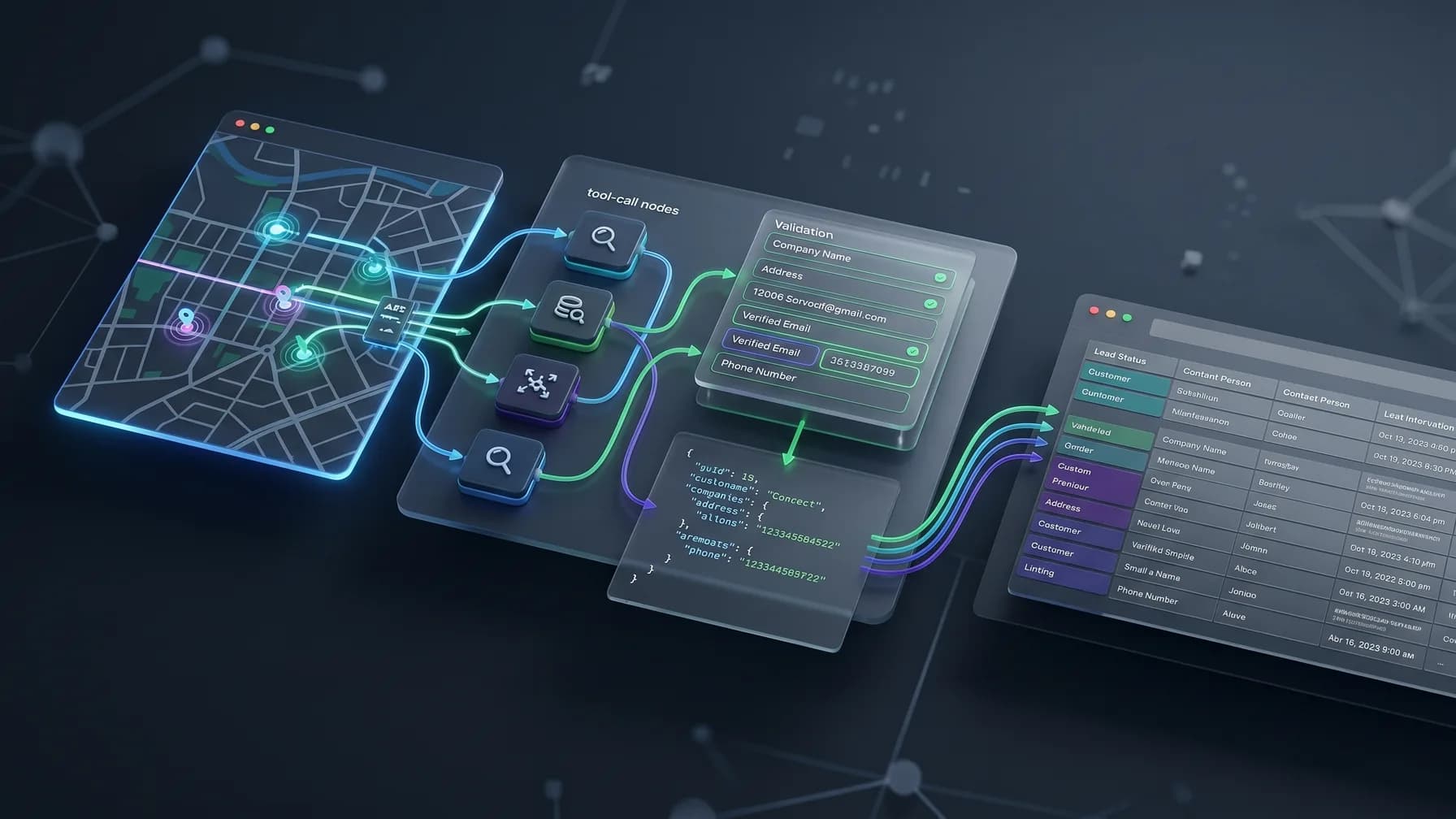
A robust AI lead generation agent should be built as a small pipeline rather than one large prompt. The agent can still feel conversational to the user, but internally it should move through well-defined stages.
1. Planner
The planner turns a natural-language instruction into a lead search plan. It extracts:
- Target geography
- Industry or keyword set
- Search radius
- Email requirements
- Quantity or batching strategy
- Exclusion rules
- Destination system
- Outreach constraints
For example, "Find dental clinics near Zurich for a partnership campaign" might become:
{
  "location": "Zurich, Switzerland",
  "keywords": ["dental clinic", "dentist"],
  "radius_km": 15,
  "scrape_emails": true,
  "destination": "crm",
  "qualification_notes": "Prioritize independent clinics and clinics with a public website."
}
The planner should ask a clarifying question only when a required field is missing or ambiguous. Most useful prospecting workflows can start with location, keywords, radius, email preference, and destination.
2. Search Tool
The search tool is the API wrapper exposed to Claude, ChatGPT, Codex, or another agent runtime. With biz collect, the tool should map directly to the lead search endpoint described in /docs. Keep the schema narrow and explicit.
A practical tool schema might look like this:
{
  "name": "create_lead_search_job",
  "description": "Start an async biz collect search for businesses and optional website emails.",
  "parameters": {
    "type": "object",
    "properties": {
      "location": {
        "type": "string",
        "description": "City, region, postal code, or address to search around."
      },
      "keywords": {
        "type": "array",
        "items": { "type": "string" },
        "description": "Business categories or search phrases, such as 'accounting firm' or 'roofing contractor'."
      },
      "radius_km": {
        "type": "number",
        "description": "Search radius in kilometers."
      },
      "scrape_emails": {
        "type": "boolean",
        "description": "Whether biz collect should extract deduped contact emails from business websites."
      }
    },
    "required": ["location", "keywords", "radius_km", "scrape_emails"]
  }
}
The implementation behind that tool sends a POST request to biz collect. The agent does not need to understand scraping, website traversal, or deduplication. It only needs to provide the right structured arguments and store the returned job_id.
This is also where OpenAPI matters. If your agent framework can ingest an OpenAPI spec, point it at the biz collect docs and generate the tool from stable request and response definitions. If you prefer to wrap the API yourself, keep the wrapper close to the documented schema so maintenance stays simple.
3. Polling Loop
biz collect jobs are asynchronous because collecting business records and extracting emails from websites can take time. The agent should treat that as a normal job lifecycle, not as an error.
The polling loop should:
- Store the
job_id - Wait for a short interval
- Poll the job status endpoint
- Continue until the job is complete or failed
- Apply a maximum timeout
- Return structured records to the next pipeline stage
A short workflow can look like this:
1. User asks for leads.
2. Planner extracts location, keywords, radius_km, and scrape_emails.
3. Agent calls create_lead_search_job.
4. biz collect returns job_id.
5. Agent polls for job status.
6. When complete, agent receives structured businesses and contact emails.
7. Agent validates required fields.
8. Agent writes approved records to CRM, spreadsheet, or automation tool.
Do not ask the language model to "wait and remember" in a vague way. Make polling a real function in your application code. For n8n, Make, Zapier, and similar tools, the same design applies: create the job, wait or retry, poll the result, then filter and write records. The n8n lead generation workflow shows that exact create-wait-poll loop as visual nodes if your agent runs inside a no-code tool. See /integrations for integration-oriented options.
4. Validation
Validation is the difference between a lead agent that is impressive in a demo and one that sales teams can use repeatedly. The agent should verify that each record is suitable for the next action.
At minimum, validate:
- Required fields are present for your workflow
- Email fields are syntactically valid if outreach depends on email
- Businesses are relevant to the requested keyword or category
- Duplicates are removed before writing to a CRM
- Existing CRM accounts or contacts are not recreated
- The record has enough context for a human to understand it later
biz collect already returns deduped contact emails extracted from business websites, which reduces cleanup in the agent layer. Still, dedupe against your own systems using normalized domains, phone numbers, and addresses before asking the model to make softer qualification judgments.
5. CRM or Spreadsheet Writer
The writer is the part of the agent that makes the workflow useful. It takes validated records and sends them to a destination such as:
- A CRM account or contact table
- A Google Sheet or Excel workbook
- A CSV export
- A webhook for an internal workflow
Keep the writer separate from the search tool. This prevents one output mapping issue from affecting lead collection and lets you reuse the same biz collect search function across multiple workflows.
A CRM mapping might look like:
{
  "company_name": "business.name",
  "phone": "business.phone",
  "website": "business.website",
  "street_address": "business.address",
  "source": "biz collect",
  "source_query": "planner.keywords",
  "contact_emails": "business.emails"
}
For spreadsheet workflows, add review columns such as search location, keyword, radius, email found, website, review status, owner, and notes. The goal is not to bury the user in raw data. The goal is to create a clean handoff point where a person or approved automation can decide what happens next.
6. Outreach Guardrails
Lead generation and outreach are related, but they are not the same system. A responsible agent should collect and organize business contact data without automatically sending messages unless the user has explicitly configured that workflow.
Useful guardrails include:
- Require user approval before first outreach
- Separate lead collection from message sending
- Store source context for each contact
- Respect suppression lists and CRM opt-out fields
- Limit batch sizes
- Avoid generating misleading personalization
- Log what the agent did and why
This article is not legal advice, and compliance requirements vary by jurisdiction, industry, and outreach channel. Treat your agent as part of a governed sales process with review points, opt-out handling, and clear campaign ownership.
Using Claude
Claude can interpret instructions, use tools, and produce structured plans, but it has no business database of its own - lead generation only works once you give it a tool that returns real records. The short version: define a tool schema around biz collect's search endpoint, expose wait: true so Claude gets results in one call instead of managing a poll loop, and let it qualify what comes back using fields like rating, review count, and resolved contacts.
The full build guide, with the tool definition, a worked prompt-to-result example, and the handoff to outreach, lives in How to Use Claude for Lead Generation.
Building a ChatGPT Lead Generation Agent
A ChatGPT lead generation agent follows the same architecture. Make the biz collect API available as a function or action with well-defined arguments, and instruct the model to call it when the user requests leads rather than answering from general knowledge.
For a custom GPT, internal app, or API-based assistant, use the OpenAPI specification from /docs where your framework supports it. If you are building functions manually, keep the names plain:
create_lead_search_jobget_lead_search_jobwrite_leads_to_crmwrite_leads_to_sheet
Avoid tool names that imply unsupported behavior, such as guarantee_buyer_intent or find_verified_decision_makers, unless your workflow truly performs those checks. The ChatGPT agent should also be explicit about asynchronous status:
I started the lead search and received job_id abc123. I will check the job status before returning records.
Once results are ready, the agent can summarize the outcome:
I found 42 businesses. 31 include websites, and 18 include at least one deduped contact email from the business website. I skipped 5 records that were missing both phone and website fields.
Use summaries like that to help the user make decisions while still handing off structured JSON for automation.
Building a Codex Sales Prospecting Agent
Codex is especially useful when the lead generation workflow lives inside a codebase. A Codex sales prospecting agent can help create the wrapper, tests, polling logic, CRM mapping, and integration scripts around biz collect.
In a developer workflow, Codex might:
- Add a typed API client for biz collect
- Generate a tool definition from OpenAPI
- Implement async polling with timeout handling
- Add schema validation for returned records
- Connect the result to a CRM SDK
- Add tests for duplicate handling and failed jobs
The boundary stays the same: biz collect collects the business data; Codex writes and maintains the software around that data flow.
A simple TypeScript shape for the workflow could be:
type LeadSearchInput = {
  location: string;
  keywords: string[];
  radius_km: number;
  scrape_emails: boolean;
};

type LeadSearchJob = {
  job_id: string;
};

async function runLeadSearch(input: LeadSearchInput) {
  const job = await createBizCollectJob(input);
  const result = await pollBizCollectJob(job.job_id);
  const validBusinesses = validateBusinesses(result.businesses);
  return validBusinesses;
}
The production details belong in the functions behind it: API authentication, retry handling, response parsing, error states, and destination-specific writes. Keep the biz collect client isolated so the agent and human developers have one place to update.
OpenAPI Tool Usage Advice
An OpenAPI tool for leads is most effective when the model sees only what it needs. biz collect provides OpenAPI 3.1 docs at /docs, which you can use directly in compatible agent platforms or as the source of your own wrapper.
When connecting the API to an agent, follow these rules:
- Expose only the actions the agent should use.
- Preserve the documented field names.
- Keep descriptions specific and operational.
- Do not put API keys in prompts.
- Treat
job_idas state that must be stored and reused. - Make polling a controlled runtime behavior.
- Validate response fields before writing to external systems.
Stable fields are important because they let you define durable downstream mappings. If your CRM writer expects business.website, business.phone, and business.emails, use the documented schema as the contract.
For many teams, the best pattern is:
OpenAPI spec -> generated API client -> narrow agent tool wrapper -> validation layer -> destination writer
That gives developers control over reliability while still giving the model enough capability to act.
Prompt Pattern for Lead Search Planning
You can use a concise prompt to keep the agent focused:
When a user asks for lead generation, create a lead search plan with:
- location
- keywords
- radius_km
- scrape_emails
- destination
- validation requirements

If location, keywords, or radius_km are missing, ask one clarifying question.
If the plan is complete, call the biz collect lead search tool.
Never invent businesses, emails, phone numbers, or websites.
After results are returned, validate records and summarize missing fields.
Do not send outreach unless the user has explicitly approved an outreach workflow.
This prompt defines when to ask questions, when to call the tool, and what not to do. It also keeps the agent from turning data collection into an unsupported outreach campaign.
You can extend the prompt for specific sales motions:
- Local agency prospecting
- Franchise or multi-location research
- Supplier discovery
- CRM enrichment
- Event territory planning
- Recruiting target account lists
See /use-cases for more ways business contact data can fit into automated workflows.
Example End-to-End Workflow
Here is a practical workflow for a user asking:
Build a list of HVAC companies within 25 km of Phoenix and collect contact emails where possible.
The agent plan:
{
  "location": "Phoenix, AZ",
  "keywords": ["HVAC company", "heating and cooling contractor"],
  "radius_km": 25,
  "scrape_emails": true,
  "destination": "spreadsheet",
  "validation": {
    "required_any": ["phone", "website", "emails"],
    "dedupe_by": ["website", "phone", "address"]
  }
}
The tool-calling workflow:
Call create_lead_search_job with the plan fields.
Receive job_id.
Poll get_lead_search_job until complete.
Read businesses from the JSON result.
Remove records already present in the spreadsheet.
Flag records with no website and no phone.
Write accepted records to the spreadsheet.
Return a short summary to the user.
The final response should explain what happened without overstating certainty: how many businesses were found, how many were written, how many were skipped as duplicates, and which records need review.
Handling Errors and Edge Cases
AI agents need boring, explicit failure handling. Lead generation workflows often fail in predictable ways:
- The user gives a location that is too broad.
- The keyword is vague.
- The radius is too large for the intended workflow.
- The job is still running.
- A website has no public email.
- A business has a phone number but no website.
- The destination CRM rejects a record.
- The same company appears under slightly different names.
Build responses for these cases before users encounter them. The agent should distinguish between "no businesses found," "businesses found but no emails extracted," "job failed," and "CRM write failed." Those states imply different next actions.
Where biz collect Fits in Your Stack
biz collect sits between your agent and your sales systems. It is not a CRM, email sender, or campaign manager. It is the structured business contacts API your agent can call when it needs fresh local business data.
That makes it useful across several stack shapes:
- Claude or ChatGPT as the planning and review interface
- Codex inside a codebase building the integration
- n8n, Make, or Zapier for low-code automation
- Custom scripts for scheduled territory research
- CRM enrichment jobs
- Internal sales tools that need business discovery
The key product behavior is simple: send one POST request with location, keywords, radius, and email scraping preference; receive an async job_id; poll for structured JSON. The result includes businesses, addresses, phone numbers, websites, and deduped contact emails extracted from business websites when scrape_emails is enabled.
That is easier to maintain than browser automation: no browser selectors, no headless browser fleet, and no search result page markup to reverse-engineer in your agent code.
Getting Started
Start with one narrow workflow. Pick a real territory, a real customer profile, and one destination system:
- "Find accounting firms within 15 km of Boston and write them to a Google Sheet."
- "Find independent dental clinics near Zurich and add qualified companies to HubSpot."
- "Find roofing contractors around Dallas and export a CSV for manual review."
Then implement the smallest reliable loop:
- Parse the user request into
location,keywords,radius_km, andscrape_emails. - Create a biz collect job.
- Poll until the job completes.
- Validate and dedupe the returned businesses.
- Write the records to one destination.
- Return a summary with counts and skipped records.
Once that works, add richer qualification, CRM matching, review queues, and outreach approval. A dependable lead data pipeline is the foundation; the agent experience can grow around it.
biz collect is currently free to start with 200 signup credits and no credit card required. You can review the API contract in /docs, explore workflow options in /integrations, and check plan details at /pricing.
The Practical Path
The best AI lead generation agent is not the one with the longest prompt. It is the one with the clearest tool boundary. Let Claude, ChatGPT, or Codex handle planning, tool selection, validation logic, and user interaction. Let biz collect handle business discovery, website email extraction, deduplication, and structured JSON output.
That separation gives you a workflow that developers can test, sales teams can understand, and operators can improve over time. Whether you call it Claude lead generation, a ChatGPT lead generation agent, or a Codex sales prospecting agent, the core pattern is the same: structured intent in, reliable lead data out, controlled writes to the systems where your team works. To extend the agent all the way to personalized outreach - finding businesses and drafting emails end to end with a human approval gate - see the AI agent lead generation pipeline.
Frequently asked questions
- How do I build an AI lead generation agent?
- Give the agent a goal, a tool that returns structured business data, and a place to write results. biz collect is the data tool: the agent POSTs a city and keywords to /v1/search, polls /v1/jobs/:id, and receives clean JSON to filter and score.
- Which models work with biz collect?
- Any model that can call tools or make HTTP requests, including Claude, ChatGPT, and Codex. The API is built for AI agents and LLM tools.
- How do I expose the API as an agent tool?
- Define a tool that calls POST /v1/search with a city and keywords, then polls /v1/jobs/:id until the job completes and returns the JSON results to the model.
- Why use an API instead of letting the agent scrape?
- Agents are good at deciding what to do next but bad at inventing data. A structured API keeps tool calls deterministic and results auditable, whereas scraping adds brittle HTML parsing, CAPTCHAs, and IP bans the agent would have to babysit.
- What data can the agent reason over?
- More than 20 fields per business -- name, phone, email, website, social profiles, ratings, reviews, hours, and live status -- so the agent can filter and prioritize on real attributes.
- Can I prototype an agent for free?
- Yes. The free tier gives 200 signup credits plus 20 daily login credits with no credit card, which is enough to build and test an agent loop end to end.